Work From Home Starter Kit (2026): Complete Beginner Setup Guide
As an Amazon Associate I earn from qualifying purchases.
Working from home sounds easy—until you realize your setup is holding you back.
Bad posture, distractions, uncomfortable seating, and messy desks can kill productivity fast.
This Work From Home Starter Kit will show you exactly what you need to create a simple, comfortable, and productive home office setup—without wasting money.
🧱 What You Actually Need for a Work From Home Setup
You don’t need a fancy office.
A solid beginner setup comes down to:
- Desk
- Chair
- Laptop or computer
- Lighting
- Basic organization tools
Let’s break it down.
🪑 1. Desk (Your Foundation)
Your desk sets the tone for everything else.
💰 Budget Pick
Furinno Simplistic Study Desk
- Small footprint (great for apartments)
- Very affordable
- Clean minimal design
👉 Best for: tight spaces and beginners

⭐ Best Value Pick
Need Computer Desk (47 inch work desk)
- More surface space
- Stronger build than ultra-budget options
- Great all-around choice
👉 Best for: long-term home office use
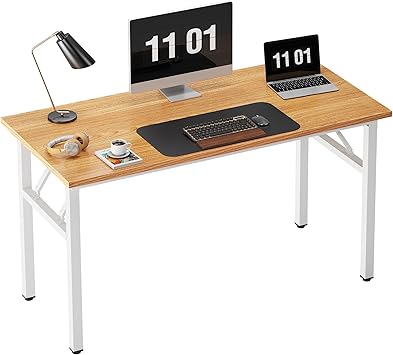
🔥 Upgrade Pick
Tribesigns Modern Desk
- Large workspace
- Very sturdy
- Premium feel without luxury pricing
👉 Best for: full dedicated workspace
🪑 2. Chair (MOST IMPORTANT FOR HEALTH)
If you spend money anywhere—spend it here.
💰 Budget Pick
BestOffice Ergonomic Office Chair
- Cheap entry ergonomic support
- Basic lumbar support
- Good starter option
👉 Best for: tight budgets

⭐ Best Value Pick
Duramont Ergonomic Office Chair
- Strong lumbar support
- Adjustable features
- Comfortable for long sessions
👉 Best for: most people (recommended)

🔥 Upgrade Pick
Herman Miller Aeron (Used/Refurbished)
- Industry standard ergonomic chair
- Extremely comfortable
- Built to last years
👉 Best for: serious remote workers

💻 3. Laptop / Computer Setup
You don’t need anything fancy—just reliable.
Recommended basics:
- MacBook Air (M2 or newer)
- Dell XPS 13
- Any solid Windows laptop with 16GB RAM
👉 Goal: smooth multitasking, not gaming power
💡 4. Lighting (Underrated Productivity Boost)
Good lighting makes you feel more focused instantly.
⭐ Best Option
LitONES LED Desk Lamp
- Adjustable brightness
- 3 Color 10 Brightness Computer Light
- Dimmable Office Lamp with Memory & Timer Func
- Metal Swing Arm Table Lamp

🧠 5. Desk Organization Essentials
A clean desk = better focus.
Must-haves:
Cable Management Kit
- Stops messy wires
- Makes setup look clean instantly
Monitor Stand
- Improves posture
- Adds storage space underneath
Desk Organizer Tray
- Keeps essentials in one place
💸 Total Setup Cost Breakdown
Here’s what a realistic setup looks like:
- Budget setup: $150–$300
- Solid setup: $300–$800
- Premium setup: $800–$2,000+
👉 You don’t need premium—just consistent comfort.
🧠 Tips for a Better Work From Home Setup
- Keep your monitor at eye level
- Sit with feet flat on the ground
- Keep your desk clutter-free
- Use natural light when possible
- Don’t overcomplicate your setup
❓ FAQ
What do I need for a work from home setup?
A desk, chair, laptop, good lighting, and basic organization tools are enough to get started.
How much does a good home office setup cost?
Most beginners spend between $300 and $800 for a comfortable setup.
What is the most important item?
Your chair. Poor seating causes fatigue and kills productivity fast.
🚀 Final Thoughts
A good work from home setup doesn’t need to be expensive.
Start simple, stay comfortable, and upgrade over time as needed.
The goal is not perfection—it’s a space where you can focus and actually get work done.
👉 Build Your Setup Step by Step
Start with:
- Chair (most important)
- Desk
- Lighting + organization
Then improve as you go.